Two accounts. One app. Both signed in.
Each group has its own cookies, localStorage, IndexedDB and cache. Your work inbox and your personal inbox stay open at the same time, and neither one knows about the other.
v1.7 · Free and open source
Silo is a desktop browser for the web apps you live in. Sort them into groups like Work, Personal or a client, and each group keeps its own cookies and storage. Stay signed in to the same app with different accounts, side by side, in one window.
Also for Windows and Linux · No account needed
Try it: open Mail in each group. Same app, three accounts, all signed in.
Why Silo
Each group has its own cookies, localStorage, IndexedDB and cache. Your work inbox and your personal inbox stay open at the same time, and neither one knows about the other.
Apps live in the sidebar instead of a pile of browser tabs. They load the first time you open them, stay put after that, and can go to sleep when idle so they don't eat your memory.
No Silo account and no Silo server. Your setup lives on your computer. Want it on your other machine too? Point Silo at a folder in iCloud Drive, Dropbox, Google Drive or OneDrive.
How it works
One per part of your life: Work, Personal, each client. Give it a name and a color.
Paste any URL. Silo picks up the site's icon, or you can swap in an emoji.
Each group remembers its own logins. Jump between apps from the sidebar or the keyboard.
Features
The small things that make a dozen always-open apps feel calm instead of chaotic.
Links that open a new window stay inside Silo as tabs in the top bar, scoped to the app that opened them.
A count on the icon when an app gets a notification in the background. Turn it off for any tab.
Idle tabs suspend after 30 minutes, 1, 2 or 4 hours to free up memory. Set the ones you need instantly to never sleep.
Choose how sites see you, per group or per tab. Handy for mobile layouts or picky sign-in pages.
A speaker icon shows which app is making noise. One click silences it.
Reorder tabs and groups, or drag a tab into another group. Fold the sidebar down to icons when you want room.
Keep groups, tabs and settings in step across machines through a cloud folder you already use.
Save your whole setup to a JSON file and restore it whenever you like.
Silo checks for new versions in the background and lets you know when one is ready.
Make it yours
Pick an accent color, then tint the sidebar and toolbar to match, or type in any hex you like.
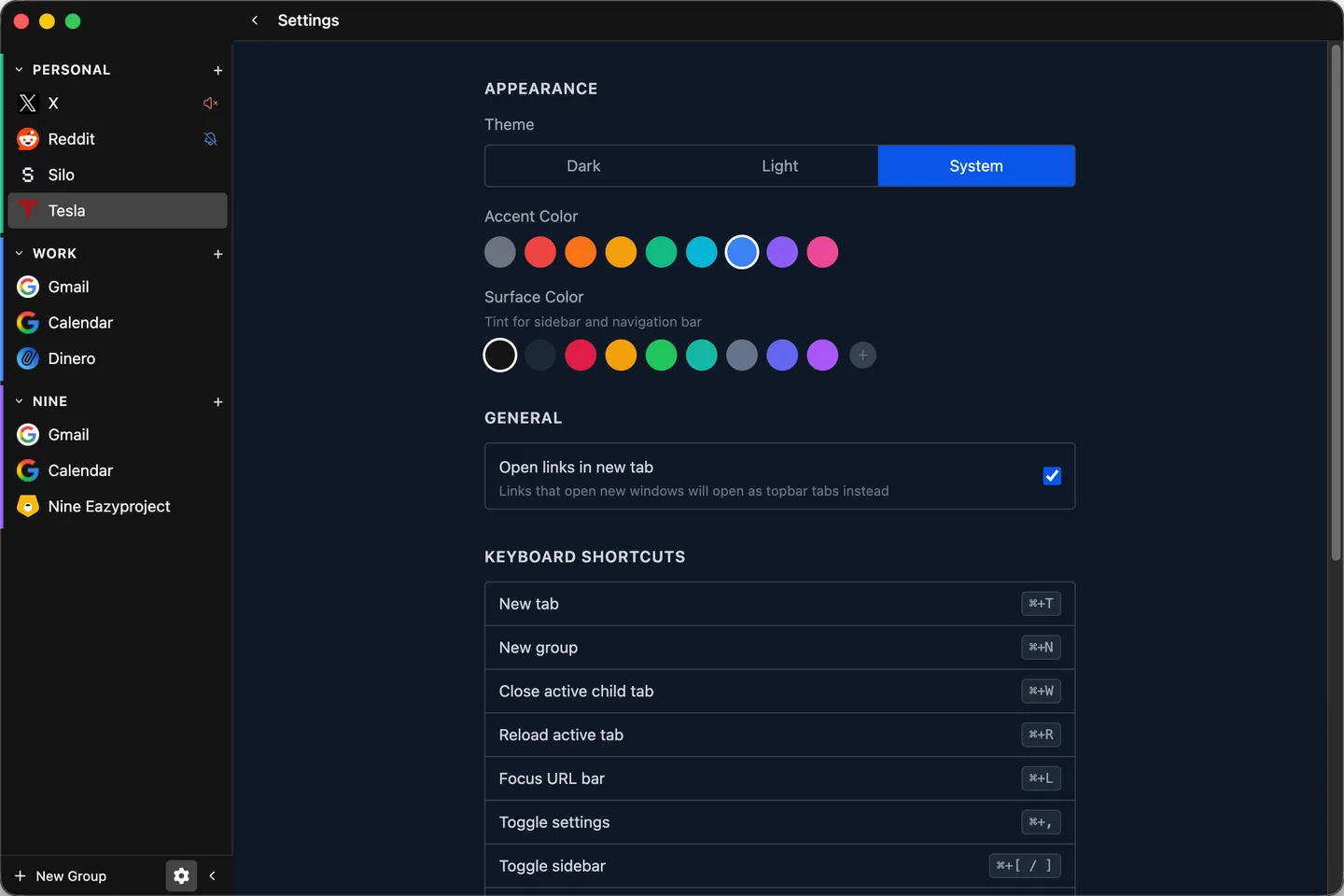
Keyboard
Everything you do all day has a shortcut. On Windows and Linux, use Ctrl where you see ⌘.
Open source
Silo is built with Electron, Vue 3 and TypeScript. It runs on Chromium on every platform, so sites look the same everywhere and sign-in pop-ups just work. Read the code, open an issue, or send a pull request.
$ git clone https://github.com/silo/silo-browser
$ cd silo-browser
$ pnpm install
$ pnpm dev
FAQ
Yes. It's open source under the MIT license. There's no paid tier and nothing to sign up for.
macOS on Apple silicon, Windows, and Linux as an AppImage or .deb package.
Profiles split your accounts into separate windows. Silo keeps every account in one sidebar, grouped the way you work, while each group's sessions stay apart.
On your computer. Your groups and settings are a local config file, or live in your sync folder if you choose one. There's no Silo server to send anything to.
Silo runs on Chromium, so most sites behave just as they do in Chrome. If one is picky about browsers, set a custom user agent for that group or tab.
Silo checks for new releases in the background and prompts you when an update is ready to install.
Download Silo, make your first group, and sign in. It takes about a minute.